Product
E-LabNotebook 3
Built by materials scientists. Ready for any research lab.
Free for Individual Use
Download and start using it — no license needed for single-user mode
What is E-LabNotebook 3?
E-LabNotebook 3 is a Windows desktop application that replaces paper lab journals with structured, searchable, auditable digital records. Originally built for materials science labs working with XRD, ellipsometry, calorimetry, and more — and equally at home in chemistry, biology, and physics labs that need structured data capture and compliance.
Every experiment is organized as an item within projects, with attached files, structured data values, notes, and a complete change history.
Key Capabilities
AI Integration (MCP)
Built-in MCP server lets AI assistants access your lab data directly. 35+ tools for navigation, search, analysis, and data entry.
Integrated Wiki
Per-project knowledge base built on Markdown. Capture goals, ideas, literature notes, and analysis alongside experiments. Cross-reference items and specimens via eln:// links, embed images and documents, and let AI assistants draft pages via MCP.
Hierarchical Project Organization
Organize experiments in nested folders and subfolders with drag-and-drop and cross-project linking.
File Attachment with Built-in Viewers
Attach any file to experiment items. Built-in preview supports images, text, and common scientific data formats.
Structured Protocol Forms
Define reusable protocol templates with required fields, value types, and validation rules.
Electronic Signatures (21 CFR Part 11)
Sign entries with password-authenticated electronic signatures, with integrity verification and audit trail.
Multi-user Collaboration
Collaborate through a shared MySQL database with project-level sharing permissions.
Full-text Search & Audit Trail
Search across all projects for items, notes, and values. Every change is recorded with timestamp and user in the audit log.
Data Analysis
Built-in scatter plot tool with linear regression analysis, unit conversion, and CSV export.
Template System
Create new items from templates to ensure standardized workflows and consistent data capture across your team.
Below is a categorized overview of E-LabNotebook 3 features. For the full feature reference, see the detailed features page .
AI Integration (MCP)
- Built-in MCP server (Model Context Protocol)
- 35+ tools for AI assistants
- Navigate, search, and analyze data via AI
- Create projects, items, and upload files
- Author wiki pages alongside experiments
- Extract data from instrument files
- Compatible with Claude, ChatGPT, and more
Wiki Pages
- New Wiki item type (Markdown body + attachments)
- Five-section layout: Goals, Ideas, Literature, Analysis, References
- Inline images via standard markdown syntax
- Cross-link items and specimens via eln:// URLs
- ETag conflict detection prevents lost edits
- AI authoring via MCP (create / read / update)
Organizing Work
- Hierarchical project and folder organization
- Drag-and-drop to rearrange items
- Full-text search across all projects
- Archive completed projects
- Tags and cross-project links
Working with Items
- Three item types: Procedures, Actions, Specimens
- Create items from templates
- Attach files of any type
- Rich-text notes
- Structured value fields
- Export and import items
Previewing Files
- In-place preview of attached files
- Auto-generated thumbnails
- Configurable preview scope
Protocols & Compliance
- Custom protocol forms
- Review workflow
- Electronic signatures (21 CFR Part 11)
- Integrity verification
Data Analysis
- Scatter plot with regression analysis
- Unit converter
- CSV export
Sharing & Administration
- Project-level sharing permissions
- Local and shared database modes
- User management
- Equipment registry
- Audit log
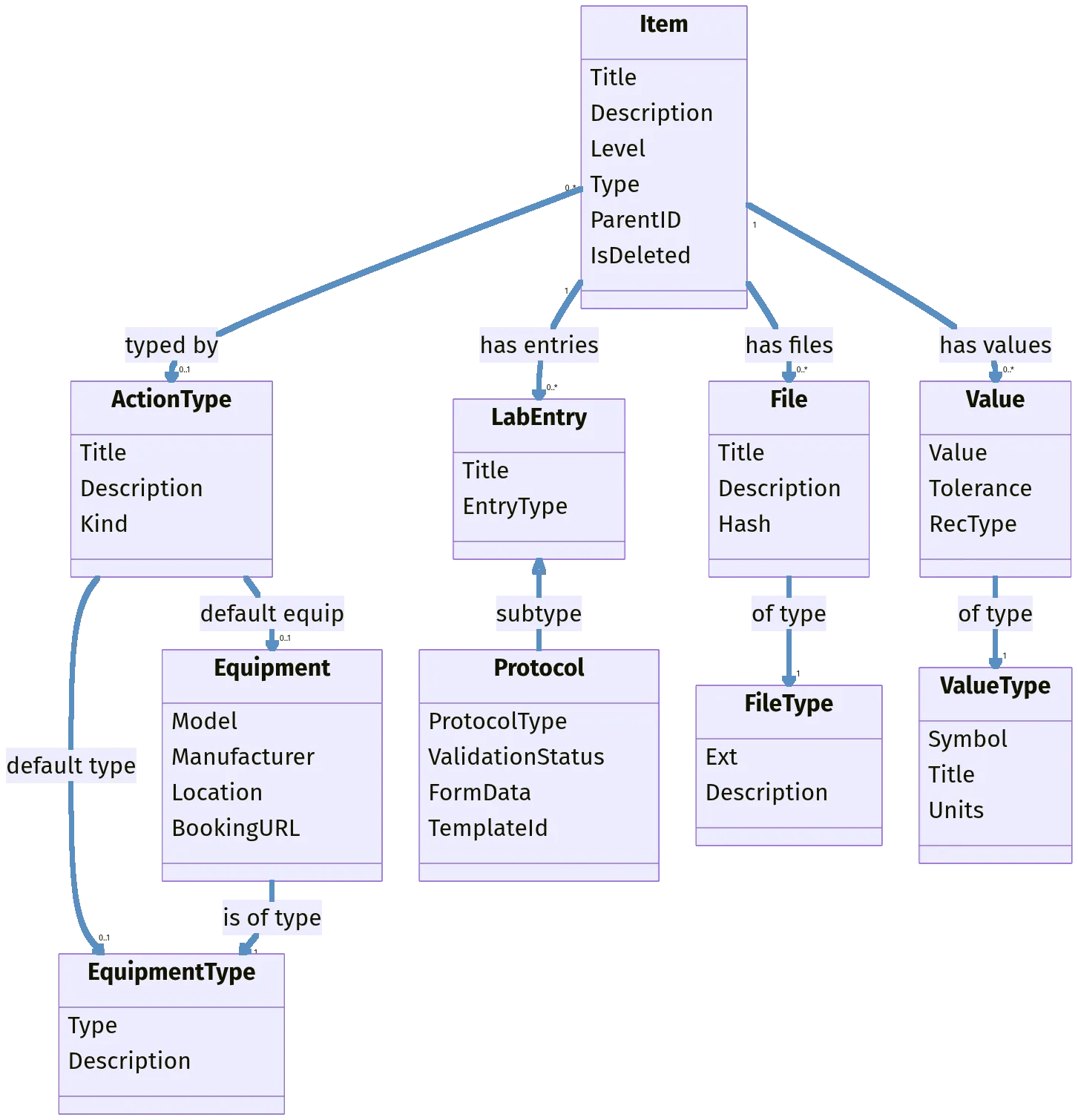
ELN3 domain model: overview of projects, folders, items, and their relationships
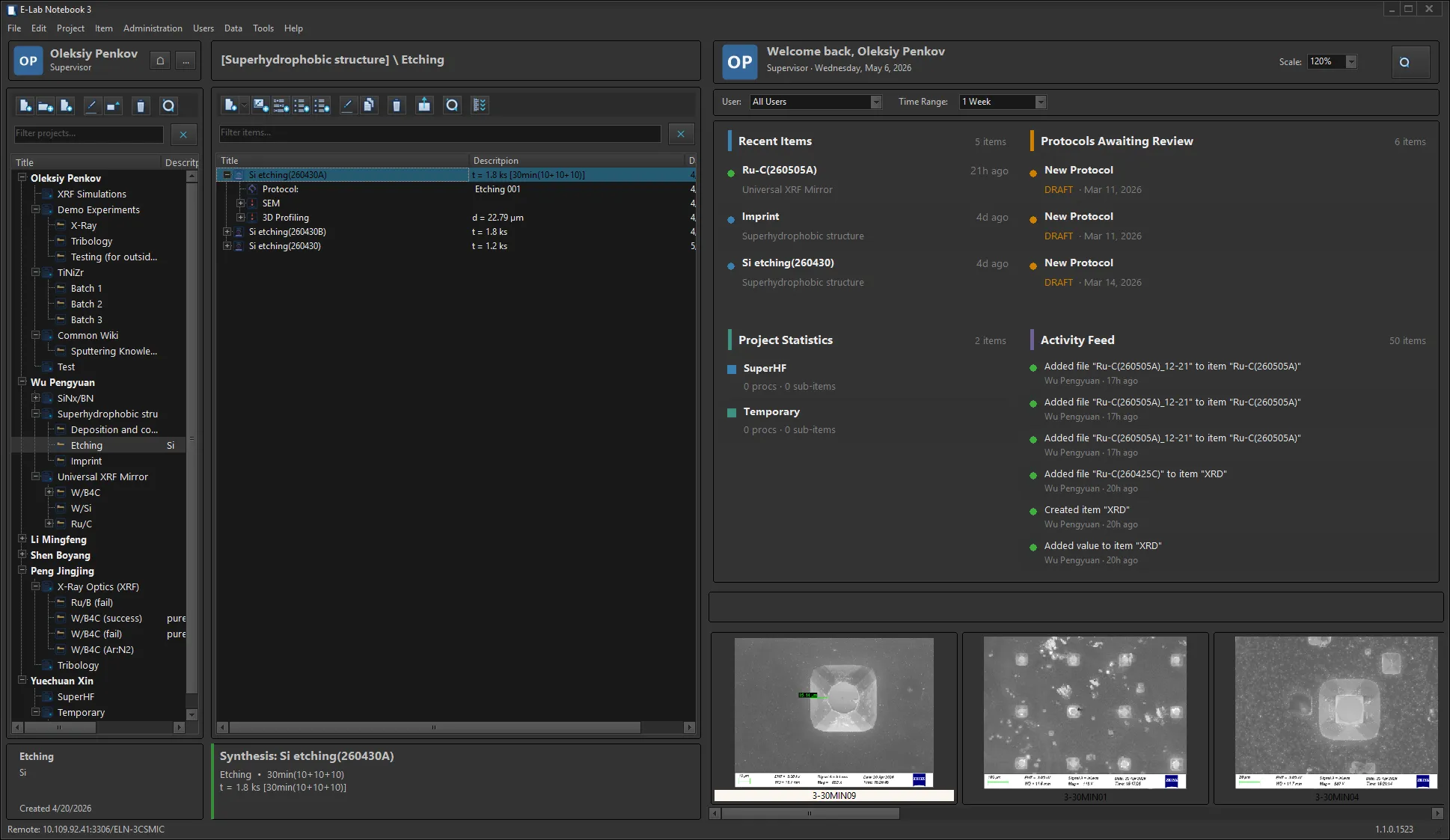
Main window: project tree, item content, and recent activity overview
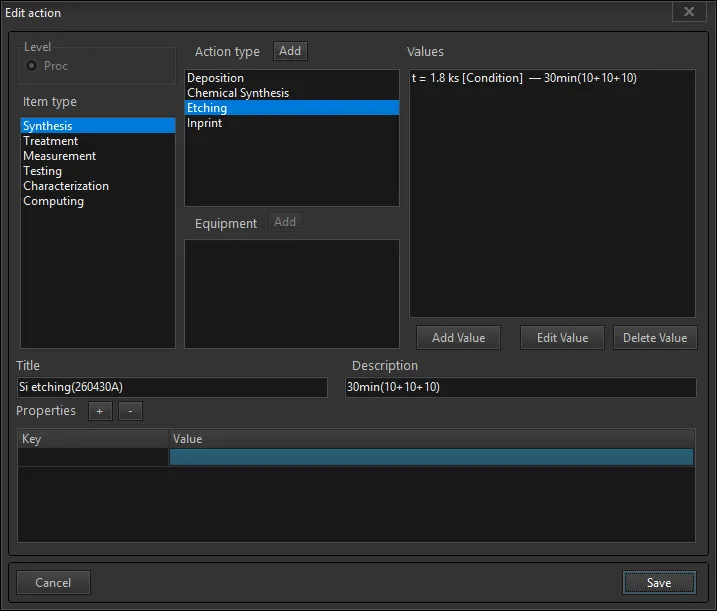
Item detail: level, type, values, equipment, and custom properties
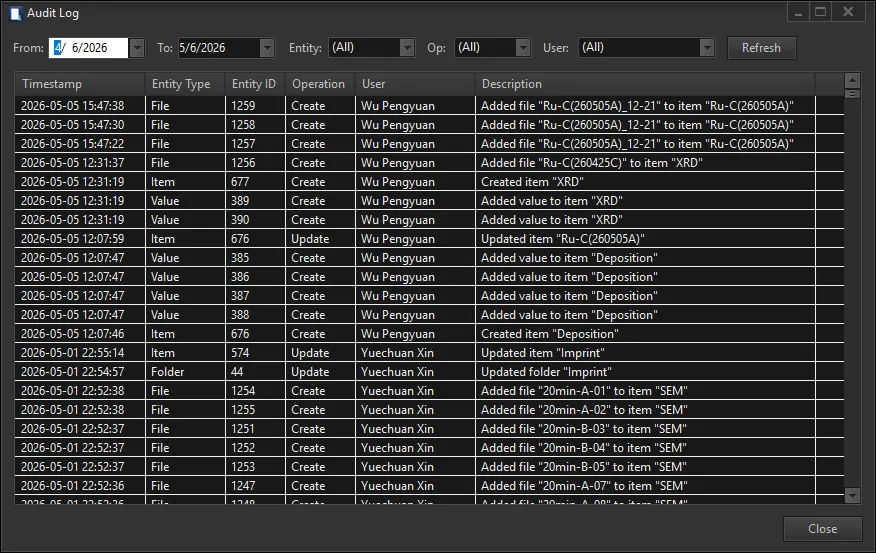
Audit log: every create and update with timestamp, user, and entity — filterable by date, entity, or operation
Technical Specifications
| Platform | Windows 10 / 11 |
| Database | SQLite (local, single-user, free) MySQL (shared, multi-user) |
| File Storage | Local filesystem WebDAV server (for shared access) |
| Authentication | Bcrypt password hashing Windows Credential Manager |
| License | Free single-user Multi-user: request a quote |
Ready to get started?
Download E-LabNotebook 3 for free, or contact us for a multi-user license quote.