Software Suite
APS Software Suite
The configurable control platform for cluster tools & multi-PLC deposition systems
Sold by SWS Vacuum Technology
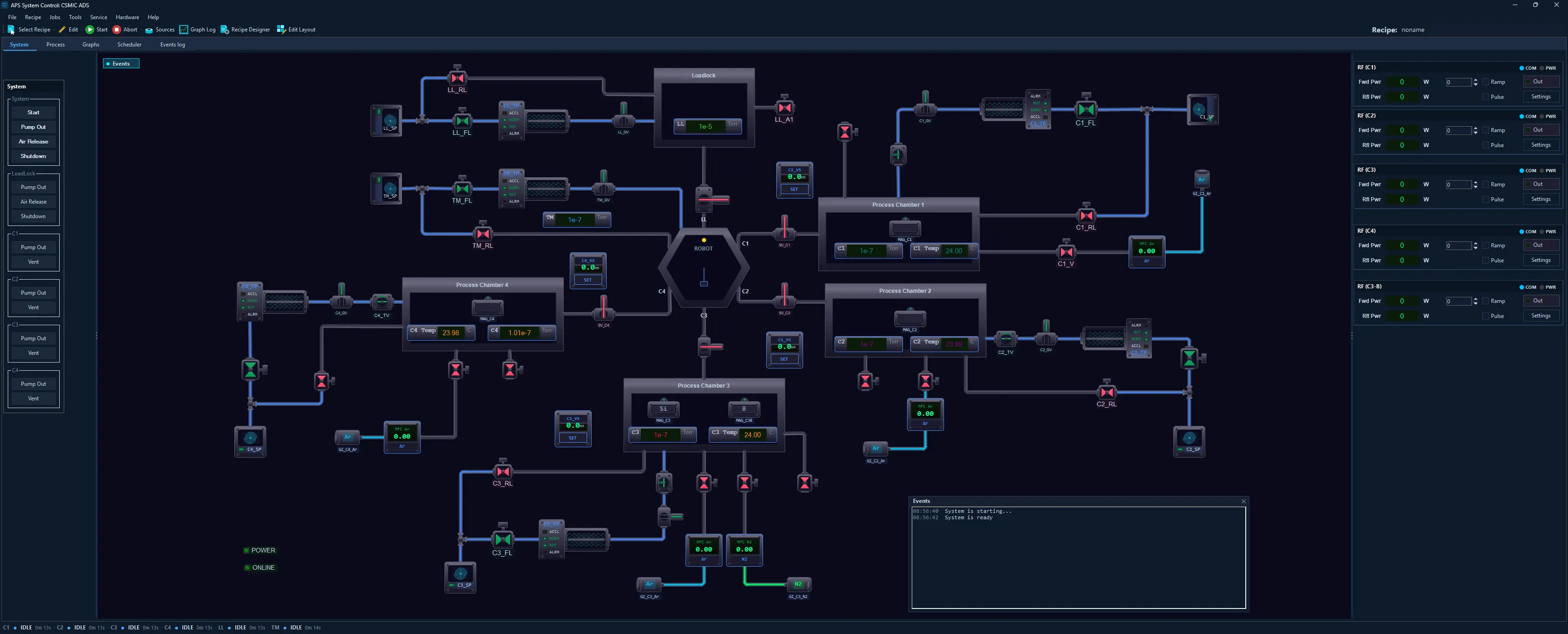
APS System Control running a six-chamber cluster tool across five PLCs: loadlock, central transfer robot, four process chambers and per-chamber RF power — the same platform, scaled up purely by configuration.
Built for clusters — one platform, four tools
Building a multi-chamber system shouldn’t mean building control software from zero. The APS Software Suite is purpose-built for cluster tools and multi-PLC systems — a loadlock, a central transfer robot and many process chambers spanning several PLCs, each with its own state machine and safety, all orchestrated by one recipe. The very same configuration scales down to a single-chamber lab tool — and you build it all without writing a line of code.
The Platform
Four integrated tools that cover the full lifecycle — from system design to production operation.
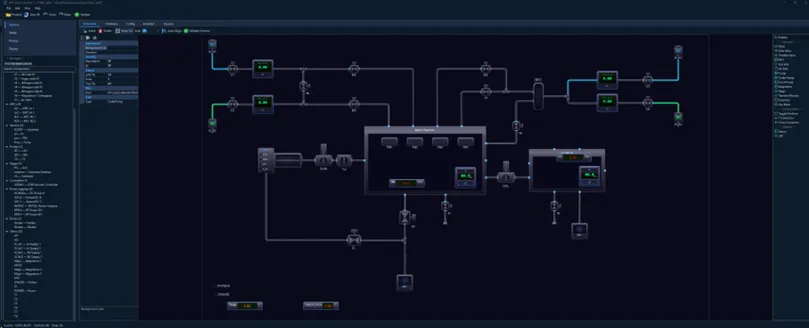
System Builder laying out a deposition system’s live schematic and hardware — every device, pipe, screen, interlock and recipe configured here, no XML, no code.
System Builder
Design & configure your whole machine — visually, no code
- ▶ Visual panel designer — drag, drop and configure 18 vacuum component types with snap-to-grid and a pixel-perfect runtime preview.
- ▶ Piping diagram editor — route pipes between components with automatic gas-type colour coding.
- ▶ Multi-PLC & cluster setup — configure many PLCs, a transfer robot and per-chamber hardware in one project, with interlock, alarm, recipe, graph and panel editors alongside.
- ▶ New-from-PLC wizard — generate a complete project straight from your existing PLC program and MCGS SCADA project.
- ▶ Live validation — real-time error checking across the whole configuration before you ever go live.
What it means for you
Commission new systems in days, not months — then change the machine yourself afterwards, without a software vendor in the loop for every tweak.
- Migrate existing MCGS projects without rebuilding from scratch.
- Keep full ownership of your configuration — no lock-in.
- One tool configures everything from a single-chamber lab tool to a multi-PLC cluster.
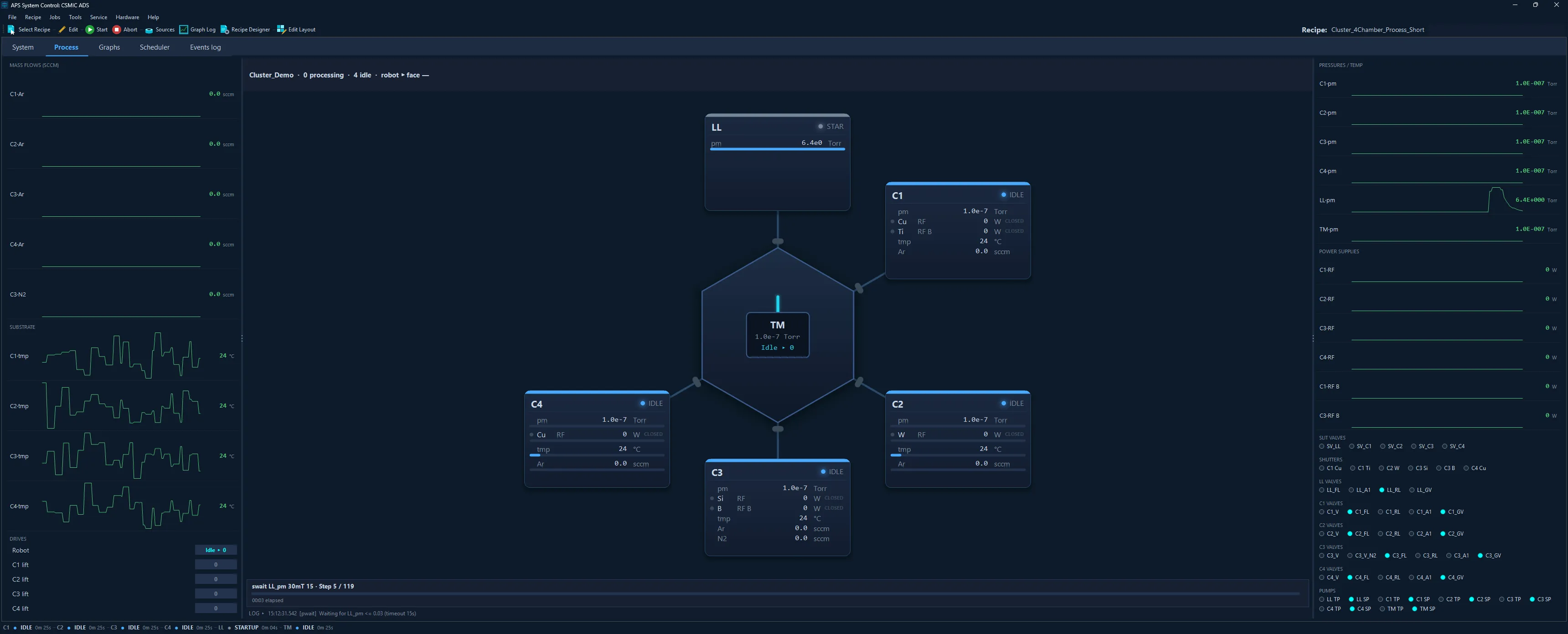
System Control — the live Process panel for a four-chamber cluster: each chamber’s pressure, power, temperature and gas at a glance, the transfer module and robot at the centre, real-time trends down both sides.
System Control
Run the machine — a modern, real-time operator experience
- ▶ Cluster tools & multi-PLC — run many chambers across many PLCs as one system, each with its own state machine; the transfer robot moves substrates on a single recipe command.
- ▶ Live schematic & process screens — valves, pumps, flows and pressures update in real time, with gas-coloured routing and custom per-chamber process views.
- ▶ Recipe automation — run structured processes with loops, variables and one-click operations.
- ▶ Safety interlocks & alarms — per-chamber state machines and an alarm banner with silence and reset.
- ▶ Trends & data logging — scrolling trend graphs plus per-run data logging to local TSV files; a MySQL / MariaDB database backs user accounts and the production job queue.
What it means for you
Operators see the whole system at a glance and run repeatable processes with a single click — on standard industrial PCs or touch screens.
- Real-time interlocks protect the hardware and the product.
- Consistent, traceable runs with continuous data logging.
- The same screen scales from one chamber to many.
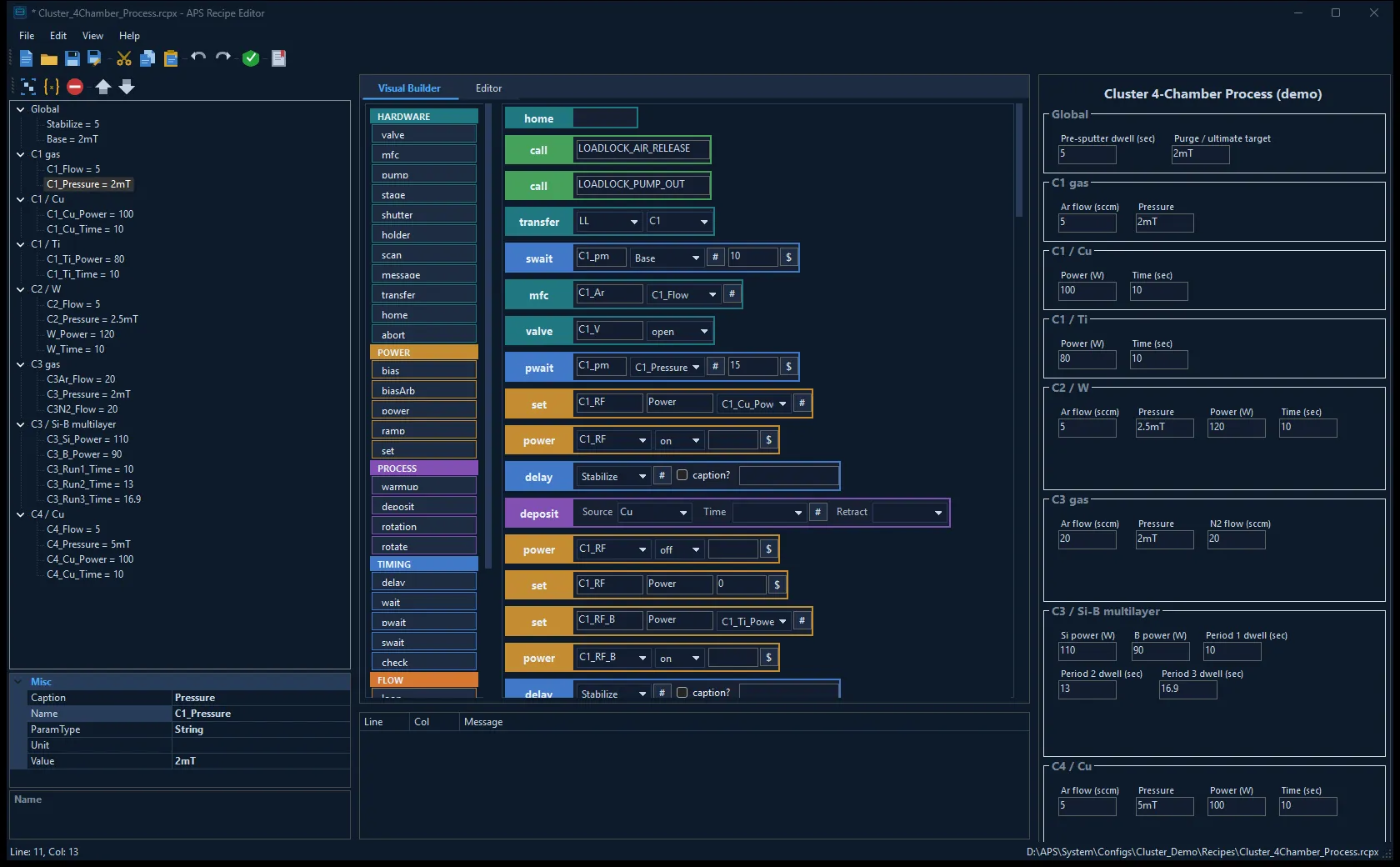
Recipe Editor — the visual recipe builder (centre) with the parameter tree (left) and the operator parameter form (right) for a four-chamber cluster process.
Recipe Editor
Engineers own the process — operators tune only what you expose
- ▶ Structured recipe format — readable, version-friendly .rcpx files that validate before they run.
- ▶ Visual block builder — assemble recipes from hardware, power, process, timing and flow blocks — or edit as text.
- ▶ Operator parameter forms — expose only safe, named parameters (power, time, pressure, flow).
- ▶ Full validation — catch errors at design time, before a recipe ever touches the hardware.
- ▶ Cluster orchestration — one recipe drives the whole multi-chamber system; a single transfer step moves wafers between chambers across PLCs.
What it means for you
Engineers lock in the proven process; operators adjust only the parameters you allow — so results stay repeatable and mistakes are designed out.
- Fewer operator errors, consistent product quality.
- Fast authoring of complex multi-material, multi-chamber recipes.
- Your process know-how stays protected inside the recipe.
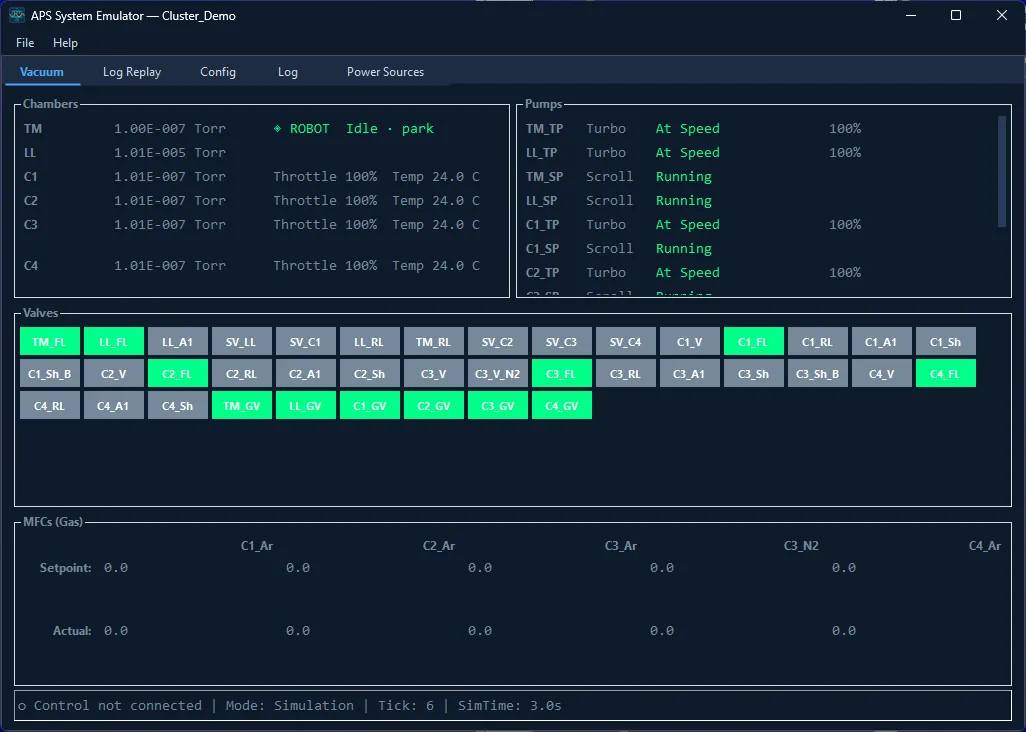
System Emulator — a complete six-chamber cluster running in simulation across several emulated PLCs: live chamber pressures, pumps at speed and gas flows, with no hardware attached.
System Emulator
Develop, commission and train — with zero hardware risk
- ▶ Real vacuum physics — pressure evolution, pump curves, throttle scaling, gas loads, leak rates and thermal loads.
- ▶ Protocol-level emulation — emulates many S7-200 PLCs at once over TCP, plus serial devices over virtual COM ports and Modbus power supplies.
- ▶ True drop-in — the identical configuration runs against the emulator and the real machine, no changes.
- ▶ Operator training — practise start-up, recipes and fault handling safely.
- ▶ Classroom licensing — install on any number of training machines for a whole lab.
What it means for you
De-risk commissioning and validate every recipe before it touches a chamber — and train operators without tying up, or endangering, a production machine.
- Bring up and test a whole multi-PLC cluster offline, before the hardware exists.
- Same configuration offline and on hardware — no surprises.
- Train a whole team in parallel, at no risk to the equipment.
Built for cluster tools & multi-PLC systems
Loadlock, transfer robot and many process chambers across many PLCs — each with its own state machine, alarms and interlocks, all orchestrated by one recipe. Add a chamber or a PLC by configuration, not re-coded SCADA.
Connected & open
The machine no longer ends at the control PC. Stream its live state to your plant tools, hand control to a host system when you choose, and let an AI assistant read the machine and prepare runs — while the operator keeps every safety action, always.
Control mode — Offline / Local / Remote
Authority is explicit and always visible. In Local the machine answers only to the operator; in Remote a host system or agent may command it, while the operator keeps every safety action — Stop, Abort, Isolate — at all times. Switching mode never disturbs a running recipe, and the current mode sits on the status bar.
Live telemetry over MQTT
A bridge service publishes per-chamber pressures, powers, temperatures, recipe progress and alarm state to any MQTT broker — ready for Grafana, Node-RED, Python or your plant historian. It runs as a Windows service, reconnects on its own and re-seeds a full snapshot after any gap, so dashboards never show stale values.
Remote commands — opt-in
Beyond monitoring, the bridge can accept commands on their own topics and answer each one with a correlated reply. It ships disabled: you turn it on per machine, and your broker’s access-control list decides who may send what. Built for teaching labs and for wiring the tool into a production line.
AI-assistant access (MCP)
Connect an AI assistant to the machine through a standard MCP bridge. It can read live status, validate and upload a recipe, start a run, and pull back that run’s log, data file and recipe afterwards. Access is over a local TLS connection with tiered keys — read-only, recipe, or manual control — and interlocks apply to an assistant exactly as they do to an operator.
Features & Capabilities
Real-Time Hardware Control
Polls Siemens S7-200 PLCs every 200ms over Ethernet — many PLCs in one system at once. Lock-free, channel-based threading ensures responsive UI even under heavy I/O. Supports serial devices and network instruments simultaneously.
Live Vacuum Schematic
Interactive system diagram with real-time device states. Valves show open/closed, MFCs display flow rates, sensors show pressure readings — all updating live. Gas routing lines colored by gas type (Ar, N2, vacuum, vent).
Recipe Automation (DSL)
Intuitive line-based recipe language with variables, loops, functions, and conditional logic. Embedded recipes for common operations (load/unload substrate, pump-down sequences). Full validation before execution.
# Sputter deposition — pump down, coat 3 layers, shut down
var base = 0.05        # base pressure (Torr)
var dep_time = 30      # per-layer deposition (s)

pump TP1 on
pwait pm $base 120      # wait for base vacuum, 120s timeout

valve M1 open
MFC Ar1 15           # 15 sccm argon
delay 10             # let pressure settle

rotation on 3.0       # start substrate rotation
loop 3                  # coat 3 layers
  shutter S1 open
  delay $dep_time
  shutter S1 close
endloop

rotation off
MFC Ar1 0            # gas off
pump TP1 off
message "Process complete — ready to unload"Visual Panel Designer
WYSIWYG canvas with percentage-based grid layout. Drag, resize, and configure 18 vacuum component types. Multi-select, snap-to-grid, alignment guides, and arrow-key nudging. Pixel-perfect preview of runtime appearance.
Piping Diagram Editor
Click-and-drag pipe routing between component anchor points. Automatic gas-type color coding (Ar=cyan, N2=green, vacuum=orange). Waypoint editing for complex routing. Full schematic export to runtime XML.
Safety Interlocks & Alarms
XML-defined interlock rules enforce safe operating conditions (pressure limits, valve sequencing, pump protection). Alarm banner with real-time notifications, silence, and reset. State machine ensures correct startup/idle/processing transitions.
Physics-Based Simulation
Real vacuum physics: chamber pressure evolution with exponential time constants, pump speed curves, throttle scaling, gas load equilibrium, leak rate modeling. MFC flow response with valve dynamics. Thermal load simulation.
Protocol-Level Hardware Emulation
Speaks native device protocols — no code changes needed in Control. Many S7-200 PLCs at once over TCP (port 102), serial devices via virtual COM ports or TCP loopback, Modbus RTU for power supplies. Complete drop-in replacement for real hardware.
Target & Consumable Tracking (Digital Twin)
Every sputter target is a tracked asset: held in a database, mounted to a serialized magnetron on a named flange. Erosion depth accrues from the actual power-time integral of every run, and the target’s groove is drawn as a cross-section with utilization and a burn-through estimate. Operators re-anchor the model with a measured depth after a service. The flange’s material is derived from whatever is mounted, so the schematic and the recipe can never disagree with the hardware.
Runtime Overrides with an Audit Trail
Disable an individual alarm rule or interlock during bring-up, or to finish a run on a known-bad gauge. Every override needs a reason, raises a persistent warning banner on the main screen, and writes each set, clear and suppressed event to the log.
Physical Control Surface
An Elgato Stream Deck plugin puts the operations you choose on physical keys, each showing live state from the machine rather than a static icon. Dangerous keys are hold-to-confirm, and a key only changes once the machine reports what it actually did.
Dark Interface Across the Suite
All five applications — Control, Builder, Recipe Editor, Emulator and License Admin — render in one industrial dark palette, chosen to cut eye strain on the long shifts of a lab or cleanroom control station.
Supported Hardware
Editions & Features
| Feature | Basic | Pro | Ultimate |
|---|---|---|---|
| Direct system control (mouse or optional touch screen) | ✓ | ✓ | ✓ |
| Configurable system diagram (live schematic) | ✓ | ✓ | ✓ |
| Embedded scripts for basic operations | ✓ | ✓ | ✓ |
| Adjustable real-time graphs panel | ✓ | ✓ | ✓ |
| Continuous data logging (local) | ✓ | ✓ | ✓ |
| Recipe scripting language (built-in worker) | ✓ | ✓ | ✓ |
| Configurable alarms and interlocks | ✓ | ✓ | ✓ |
| Cluster tools & multi-PLC orchestration | ✓ | ✓ | ✓ |
| Support of custom PLC controllers | ✓ | ✓ | ✓ |
| Support of custom vacuum components | ✓ | ✓ | ✓ |
| Support of custom hardware panels | ✓ | ✓ | ✓ |
| Basic integration package * | ✓ | — | — |
| Advanced integration package ** | — | ✓ | ✓ |
| APS System Builder (visual configuration tool) | — | ✓ | ✓ |
| APS System Emulator (offline hardware simulator) | — | ✓ | ✓ |
| APS Recipe Editor (operator parameter forms) | — | ✓ | ✓ |
| Remote system status monitoring *** | — | ✓ | ✓ |
| Custom script language (custom workers) | — | — | ✓ |
| Jobs scheduler | — | — | ✓ |
| Custom detailed process screen | — | — | ✓ |
| Remote data logging (planned) **** | — | — | ✓ |
| Control mode — Offline / Local / Remote | ✓ | ✓ | ✓ |
| Runtime alarm & interlock overrides (audited) | ✓ | ✓ | ✓ |
| Target & consumable tracking (digital twin) † | — | ✓ | ✓ |
| Stream Deck physical control surface | — | ✓ | ✓ |
| Live telemetry stream & MQTT bridge | — | — | ✓ |
| Remote commands over MQTT (opt-in) | — | — | ✓ |
| AI-assistant access (MCP bridge) | — | — | ✓ |
* Basic integration package: configuration file examples, source code templates, and examples of custom DLLs for hardware, controllers, interlocks, alarms, custom panels, and embedded scripts.
** Advanced package: everything from Basic plus configuration, templates, and examples for custom workers and custom process panels.
*** Requires a remote HTTP server. **** Planned capability; will require a remote database server (MySQL / MariaDB).
† Target and consumable tracking requires a MySQL / MariaDB server for the target database.
Licensing
Perpetual (lifetime) license per installation per single PLC unit — add a license per PLC for multi-PLC cluster systems. Includes 1 year of free support and updates within the same major version. System Emulator offers classroom licensing for any number of training machines. Contact us for a detailed quote.
Integration Services
We offer full system integration with your hardware, including custom driver development, panel design, recipe authoring, and on-site commissioning support. Each engagement includes a 1-year warranty. Extended support contracts available.
Platform Requirements
Operating System: Windows 10/11 x64 · Runtime: .NET 9.0 · PLC: Siemens S7-200 (Ethernet, multiple)
The APS Software Suite runs on standard industrial PCs, with optional touch-screen panel and tablet support. No proprietary hardware required beyond your PLCs and instruments. Fully compatible with standard Siemens S7-200 PLCs used throughout the vacuum industry.
See it live
A live view straight from a real, running APS System Control instance.
Ready to modernize your vacuum system control?
Purchase the complete APS Software Suite through SWS Vacuum Technology.
Buy the System